Get paid on time,
without the awkwardness
Attach the final files to your invoice. PayTrack keeps them locked until your client pays, then emails them over the moment it clears. The payment does the handover, so you never send a fourth polite reminder again.
Free to start. Set up in under 5 minutes.
Chasing payments is awkward.
You didn't start your business to become a debt collector. Every minute you spend sending "just checking in" emails is a minute you're not billing for.
Everything you need to get paid
PayTrack handles the boring admin work so you can focus on what you do best. It's like having a part-time assistant for €19/mo.
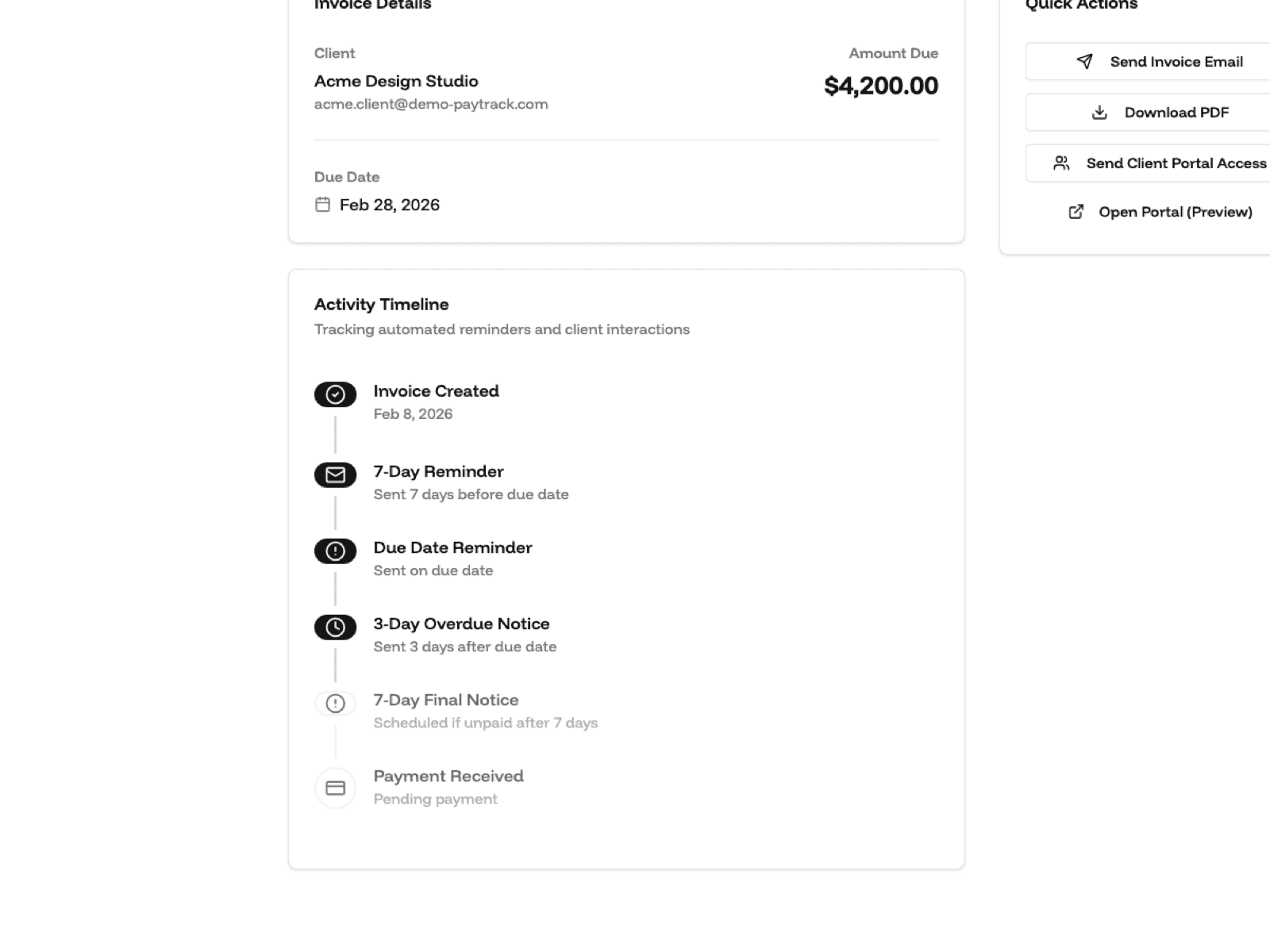
Set it and forget it. PayTrack automatically sends friendly reminders 7 days before, on the due date, and (if needed) follows up on overdue invoices. You never have to write an awkward email again.
Every reminder goes out as a clean, itemised email with the amount, the due date, and a Pay button — the kind of thing an accounts department expects. Nothing in it reads like a nudge from a freelancer who is out of pocket.
Give your clients a professional dashboard to view all their invoices, download PDFs, and see payment history. No more 'Can you resend that invoice?' emails.
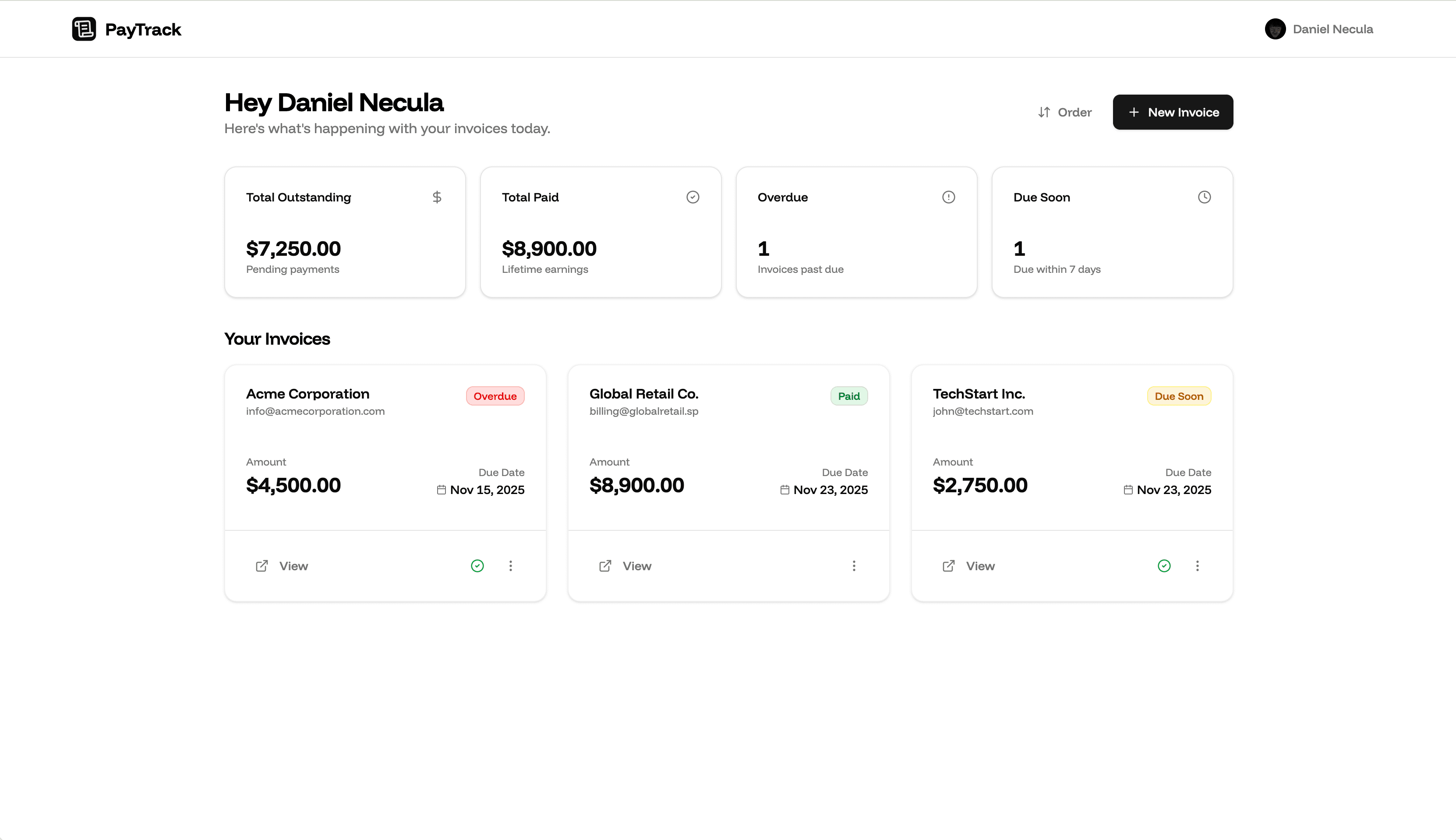
See exactly who owes you what in seconds. Filter by Paid, Overdue, and Upcoming. Know your monthly revenue at a glance without complex accounting software.
Two plans, no small print
Two clear plans. Start free, then upgrade only when you need automation and scale.
Free
For freelancers getting started with invoice tracking and simple payment collection.
- Track up to 5 active invoices
- Invoice dashboard with filters and stats
- Shareable payment links for clients
- Attach up to 3 files per invoice, released on payment
- Manual mark-as-paid with instant status updates
- One-click upgrade whenever you outgrow limits
No credit card required
Pro
For freelancers who want unlimited invoicing and automated reminder workflows.
- Unlimited invoices, clients, and payment links
- Smart reminder cadence (7d before, due, 3d and 7d after)
- Automated email delivery through Resend
- Attach up to 10 files per invoice, released on payment
- Client portal with live invoice status updates
- Stripe subscriptions and customer billing portal
7-day money-back guarantee
Everything you’d ask before signing up
Short answers on getting paid, what the reminders sound like, where the free plan runs out, and what happens if you leave.
You plug in your own Stripe account, so payments land in your Stripe balance and pay out on your normal schedule. PayTrack never holds the money and takes no cut of what you invoice. Prefer a bank transfer with a particular client? Send the invoice anyway and mark it paid yourself once the money shows up.
Seven days before the due date, on the due date, then three days and a week past it. Each one is a short formal notice with your name on it, the invoice reference, the amount and a Pay button. Nothing that reads like a freelancer asking for a favour. Only the most recent stage is ever sent, so a client who ignores you for a fortnight gets one email rather than four. After 30 days overdue PayTrack stops. By then it needs a phone call.
Five open invoices at a time, the dashboard, shareable payment links, and mark-as-paid. Paid invoices stop counting against the five, so if your clients keep paying you can sit on the free plan indefinitely. Automated reminders and the client portal are Pro, at €19 a month or €180 a year.
No. An invoice is just a link. They open it, they see what they owe, they pay. If a client wants their whole history in one place, the portal emails them a six-digit code instead of asking them to invent another password. No account, no app, no onboarding.
Yes, that is the whole point of attachments. Drop the final files onto the invoice and PayTrack emails them across the moment it is marked paid. Three files per invoice on free, ten on Pro, up to 10MB each. If you have ever handed over the artwork and then spent three weeks asking about it, this one is for you.
Mark it paid and the rest follows on its own. Reminders stop, your client gets a confirmation email, and any attached files go out with it. The dashboard treats it exactly like a card payment, so your totals stay honest.
You stay on Pro until the end of the billing period, then drop back to free. Nothing is deleted. Your invoices, clients and PDFs are all still there. You lose the automated reminders and go back to five open invoices at a time. Cancelling takes two clicks in settings and nobody emails you to ask why.
Still have questions? Talk to a human. We answer within a working day.
Stop chasing invoices. Let PayTrack do it for you.
Create your account, connect your workflow, and start sending payment-ready invoices with automated reminders in minutes.
No credit card required for Free. Upgrade anytime.
Why freelancers use PayTrack
- Clear, live status for every invoice across all clients.
- Smart reminders reduce late payments without awkward follow ups.
- Stripe-powered billing flow with secure checkout and portal support.